

Did you think no-code automation had reached its limits? Make.com has just shattered that certainty with its AI Agents, a feature that turns the platform into a truly autonomous brain. No more rigid scenarios where every condition has to be manually anticipated. Make’s AI Agents make real-time decisions, interpret your instructions in natural language, and orchestrate your tools like a human assistant would—but without the coffee breaks.
This announcement marks a strategic turning point for Make.com. Facing the rise of n8n with its advanced AI capabilities, the platform needed to respond.
And the response is a strong one: agents capable of reasoning, planning, and executing complex tasks without you needing to program every branch.
For businesses juggling CRM, emails, Slack, and databases, this promises a huge boost in efficiency.
But how effective are these AI Agents really? What are their limitations? And most importantly, how do they stack up against n8n, which has had a native AI architecture for longer?
This guide breaks down everything: features, real-world use cases, pricing, and an honest comparison between both platforms.
What Are Make’s AI Agents?
A Make AI Agent is not just another automation module. It’s an autonomous assistant powered by a Large Language Model (GPT-5, Claude, or another), capable of understanding a goal expressed in plain language and figuring out how to accomplish it on its own.
In practice, instead of building a scenario with dozens of filters, routers, and if/then conditions, you just describe what you want to achieve.
The agent analyzes the context, selects the appropriate tools from your existing scenarios, and carries out the necessary actions.
Traditional Automation vs AI Agents
With a classic Make scenario, every possibility needs to be anticipated. An email arrives? You must plan the branches: is it urgent? Is the customer VIP? Should you respond automatically or escalate? Each situation requires its own logic.
The AI agent works differently. You give it an instruction like: “Analyze incoming emails, identify urgent requests from premium clients and respond to them with priority. For the rest, sort them by topic.” The agent interprets every email individually and decides the right action.
This difference eliminates what Make users call “gas factories”—those sprawling, unmaintainable scenarios that become a nightmare to manage after a few months of edits. If you’ve already explored creating AI agents on Make, you know how transformative this simplicity can be.
Make’s Architecture and Vision
Agents are based on On-Demand scenarios, reusable Make workflows that the agent can call as tools. You create a “FindCRMClient” scenario, another for “SendPersonalizedEmail,” and the agent combines them as needed.
This modular approach lets you build libraries of standardized tools, reusable by multiple agents. Make has introduced Make Grid to visualize and oversee these complex orchestrations—a direct answer to the no-code community’s call for more control over autonomous automations.
Innovative Features in Detail
Autonomous Decision-Making
The autonomy of Make agents relies on their ability to make contextual decisions. When an agent receives a message, it doesn’t follow a predefined decision tree. Instead, it analyzes the content, compares it to the instructions it received, and determines the best response.
This real-time adaptation results in workflows that can handle unexpected situations. A client asks a question outside the usual scope? The agent can recognize that it doesn’t have the tools to answer and escalate intelligently instead of crashing or sending a generic response.
Key point: Make agents don’t replace your existing scenarios—they orchestrate them intelligently. Your existing automations become “tools” the agent calls as needed.
Planning and Reasoning
Complex tasks require breaking down into steps. Ask an agent to “prepare a weekly sales report and send it to the team,” and it will:
- Identify the necessary data (weekly sales)
- Call the appropriate tool to extract that data
- Format the information into a readable report
- Select the delivery channel (email, Slack)
- Send to the right recipients
The “steps per agent call” parameter allows you to control how deep this reasoning goes. An agent limited to three steps will be faster but less able to handle complex missions. At ten steps, it can orchestrate sophisticated workflows but consumes more tokens.
Error Handling and Resilience
Make agent error handling is basic compared to n8n. Standard error routes apply, and the agent can learn from context via the LLM to adjust its behavior.
However, Make does not yet offer built-in long-term memory. If an agent fails at a task, it doesn’t “remember” that error for the next run. Workarounds exist (storing histories in Airtable or Notion), but this remains a point where n8n has the advantage with its integrated vector stores.
Integrations and Capabilities
The Make ecosystem shines with over 3000 connectable apps: Slack, Gmail, Airtable, Notion, Typeform, Telegram, HubSpot, Salesforce… Every integration can become a tool for your agents.
Multimodal inputs arrived in 2026: your agents can now process documents, images, and audio files. An agent can analyze a PDF invoice, extract the information, and log it in your accounting—all without human intervention.
As for AI models, Make supports OpenAI (GPT-4), Anthropic (Claude), and enables connections to Hugging Face for specialized models. This flexibility avoids vendor lock-in.
Interface and Configuration
Creating an agent follows a 5-step process:
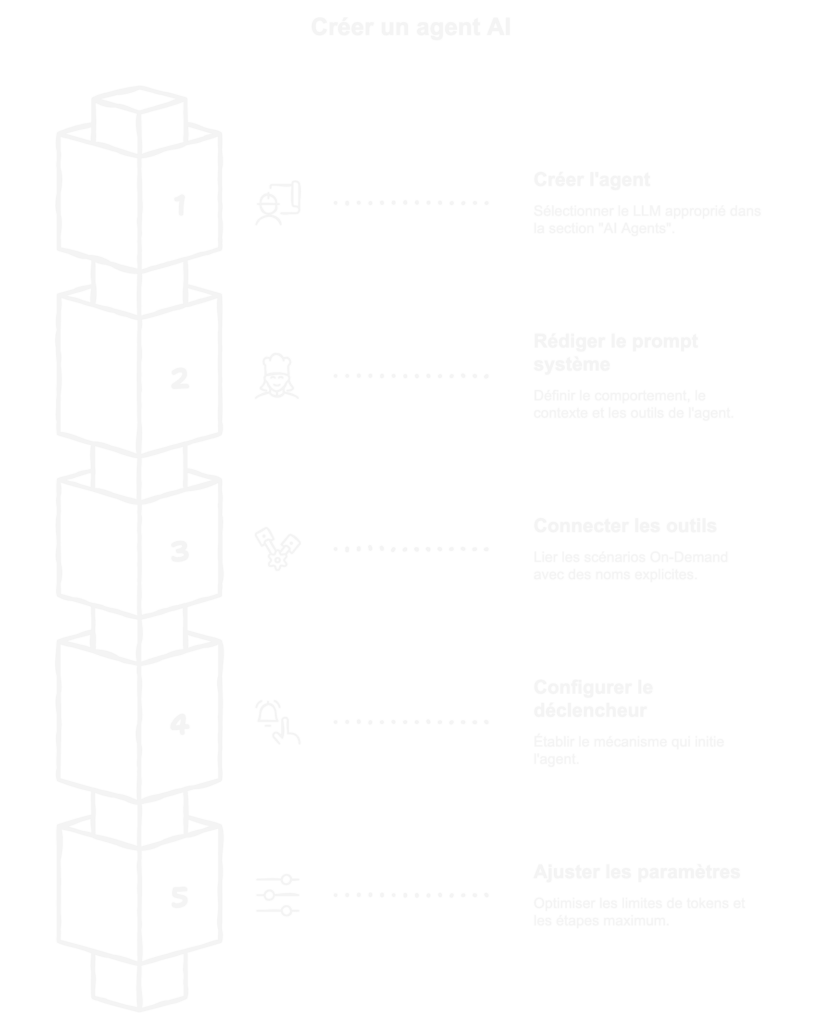
- Create the agent: “AI Agents” section > “Create agent” > Choose LLM
- Write the system prompt: Behavioral instructions, business context, available tools
- Connect the tools: Link your On-Demand scenarios with clear names
- Set up the trigger: Webhook, Telegram message, scheduled time
- Adjust settings: Token limit, max number of steps
The reasoning panel added in 2026 shows the agent’s “thinking”: what tools it considers, why it chooses one over another. This is extremely helpful for debugging.
Real-World Use Cases and Examples
Multichannel Customer Support
Imagine an SMB that receives messages via Telegram, Slack, and email. Without an agent, that’s three separate scenarios with duplicated logic. With an agent:
The agent receives the message (no matter the channel), analyzes urgency and sentiment, checks if the sender is a VIP client in the CRM, then decides: auto-reply for common questions, escalate to a human for sensitive cases, prioritize premium clients. One agent replaces three scenarios and handles unforeseen cases.
Intelligent Automated Newsletter
Creating a relevant newsletter every week is time-consuming. An agent can search for industry news via Perplexity, select the most relevant items based on your criteria, draft a newsletter, and place it in Gmail for your review. The content automatically adapts to current trends.
Intelligent Form Processing
A prospect fills out a Typeform. The agent analyzes their responses, determines their profile (hot lead, cold lead, off-target), enriches their data with scraping tools, adds them to the CRM with the right status, and triggers the right nurturing workflow. Zero manual intervention, dynamic segmentation.
These cases illustrate three measurable benefits: a 60-80% reduction in processing time, fewer routing errors, and automatic adaptation to non-standard cases.
Limitations to Know
Agents aren’t suitable for everything. Highly regulated processes (banking compliance, healthcare) where every decision must be traceable and predictable?
Stick to traditional scenarios. Tasks requiring long-term contextual memory (customer conversations over several weeks)? Make’s workarounds aren’t as elegant as n8n’s solutions. Tight token budgets? An agent that “thinks” consumes more than a fixed scenario.
Pricing and Availability
AI Agents are included in existing Make plans, but their use consumes operations and AI tokens based on the chosen model.
Make’s pricing model is based on monthly operations (1,000 up to unlimited depending on the plan). An agent call counts as several operations: the agent execution itself, plus every tool it triggers. An agent using three tools will consume at least four operations.
The potential hidden costs come from LLM tokens. Make bills usage of OpenAI or Claude models according to their pricing.
A verbose agent with a long system prompt and detailed responses can cost several cents per run. Multiply that by thousands of runs per month and the bill climbs.
For an SMB processing 500 emails per month with an agent, expect to pay between €50 and €150 monthly (Make subscription + tokens). The ROI remains positive if the agent replaces several hours of human work per week, but monitor your token usage in the first few weeks.
Agents are available on all paid plans, with limitations on the free plan. Beta is over; features are fully operational.
Comparison with n8n for AI
The Make vs. n8n AI showdown deserves an honest look. Both platforms have different philosophies, and our detailed comparison of n8n and Make AI agents delves deeper into these differences.
Fundamentally Different Approaches
Make has built its agents on top of its existing ecosystem. Tools are scenarios, the interface remains no-code, and the learning curve is gentle. n8n has integrated AI natively into its architecture, with LangChain, vector stores (Pinecone, Qdrant), and persistent conversational memory.
The result: Make is great for deploying an agent quickly without touching code. n8n allows for more sophisticated agents but requires technical know-how.
| AI Feature | Make AI Agents | n8n |
|---|---|---|
| Architecture | Agents + scenarios as tools | Native LangChain, vector stores |
| Memory | Workarounds necessary | Native conversational memory |
| Supported models | OpenAI, Claude, Hugging Face | OpenAI, Claude, local models |
| Self-hosting | No | Yes (full data control) |
| Integrations | 3000+ native apps | 400+ nodes, flexible HTTP |
| Learning curve | No-code friendly | Technical skills required |
| Ideal use case | SMBs, marketing, basic support | Dev, complex AI, privacy |
Which Should You Choose?
Pick Make if you want an operational agent in an hour, your team doesn’t include a developer, or your AI needs are “standard” (email sorting, auto-replies, simple orchestration).
Pick n8n if you need long-term contextual memory, self-hosting for privacy, or your agents need to use custom or locally hosted AI models.
Both platforms can coexist. Use Make for daily business automations with simple agents, and n8n for specialized AI workflows that need more control. A webhook can connect both.
Our Verdict and Recommendations
Strengths of Make AI Agents
The ease of deployment is the top asset. An existing Make user can build their first functional agent in under an hour. The integration with 3000+ ecosystem apps transforms every current scenario into a potential tool for the agent.
The reasoning panel brings much-needed transparency. Understanding why the agent chose a given action makes debugging and progressive prompt improvement much easier.
To discover more Make automations every entrepreneur should know, this transparency remains a key advantage.
Points to Watch
The lack of native long-term memory limits advanced conversational use cases. Token costs might surprise users used to fixed-operation pricing. And dependence on Make’s cloud (no self-hosting) may be a concern for companies with strict regulatory requirements.
Who Is It For?
Make AI Agents are ideal for SMBs, marketing teams, solopreneurs, and agencies who want smart automation without hiring a developer. If you already run your workflows on Make and find your scenarios too rigid, agents are the logical next step.
For complex AI projects requiring RAG, vector stores, or fine-tuned models, n8n is still a better fit. The good news? The market now offers two mature solutions for different needs.
Our recommendation: Test Make AI Agents with a simple use case (email sorting, FAQ auto-reply) before migrating complex scenarios. The time you invest in mastering effective prompt-writing will pay off for all your future agents.
Conclusion
Make.com’s AI Agents mark a milestone in democratizing intelligent automation. By allowing non-developers to deploy autonomous AI agents, Make brings within reach what used to require programming and machine learning skills.
This shift is influencing the entire market. Zapier is accelerating its AI developments, n8n is strengthening its technical edge, and users benefit from the competition.
No-code automation is no longer just “if this then that”—it’s becoming capable of reasoning and adaptation.
To try it out, create a Make account (free to start), identify a repetitive workflow that frustrates you, and build your first agent.
You might be surprised by the results—or see the current limitations. Either way, you’ll have an opinion based on experience instead of marketing promises.
FAQ
Do you need programming skills to use Make AI Agents?
No, agents are fully no-code. You write instructions in natural language and connect your existing Make scenarios as tools. The key skill is prompt-writing, not coding.
How much does a Make AI agent cost per month?
The cost depends on your Make plan (from €9/month) plus LLM tokens consumed. A moderately used agent (500 monthly executions) costs between €20 and €50 in tokens, depending on task complexity.
Can Make AI Agents replace an employee?
They can automate repetitive tasks previously handled by staff (email sorting, FAQ replies, updating a CRM). But they don’t replace human judgment for complex or sensitive decisions.
What’s the difference between a Make scenario and an AI agent?
A scenario follows a fixed logic predefined in advance. An agent interprets objectives and decides which actions to take, using scenarios as tools based on context.
Do Make agents work with models other than GPT-4?
Yes, Make supports Anthropic’s Claude and allows connections to Hugging Face. You can pick a model for your needs—performance, cost, or specialization.
Can you use Make AI Agents offline or with self-hosting?
No, Make is cloud-only. For self-hosting and full data control, n8n is the alternative to consider.
Do the agents retain memory of past conversations?
Not natively. You have to set up workarounds (store history in Airtable, Notion) for the agent to access previous records. This is a limitation compared to n8n, which offers built-in conversational memory.
How long does it take to build a functional first agent?
Between 30 minutes and two hours for a simple agent (email sorting, auto-reply). More complex agents that orchestrate several tools take longer to refine prompts and cover edge cases.
Are Make AI Agents reliable for professional use?
Yes, the beta is over and features are stable. But like any LLM-based system, responses can vary. Plan for human supervision with critical tasks, and test thoroughly before going live.
Make or n8n: which should I choose to start with AI agents?
Make for a quick start and a broader ecosystem of integrations. n8n if you have technical skills and advanced AI needs (long-term memory, vector stores, self-hosting).
Related Articles

What if we got rid of all politicians? The (not so crazy) case for AI-driven governance
From envelopes under the table to the world’s shadiest power networks, the verdict is always the same: Those who govern us seem to play in a league of their own—the…

When AI Leaves Earth: Elon Musk’s Plan Explained
For twenty years, Silicon Valley believed that software would eat the world. This absolute certainty in the power of code is now colliding with a much more down-to-earth reality: the…